Your passcode, your choice
A 4, 6 or 8-digit passcode, a password or a pattern. Add Face ID or Touch ID on top, or leave biometrics off. Wrong guesses are slowed with growing delays.
 Vault MaxApp Store · October 23
Private photo vault. No cloud.
Photos, videos, notes and files encrypted on your iPhone, iPad and iPhone Duo. Nothing is uploaded, nothing is collected, and there is no account to create. Buy it once and own it.

No account, no servers, no analytics, no subscription. The app's only network traffic is to the App Store, for the purchase. There is no telemetry and nothing to opt out of.
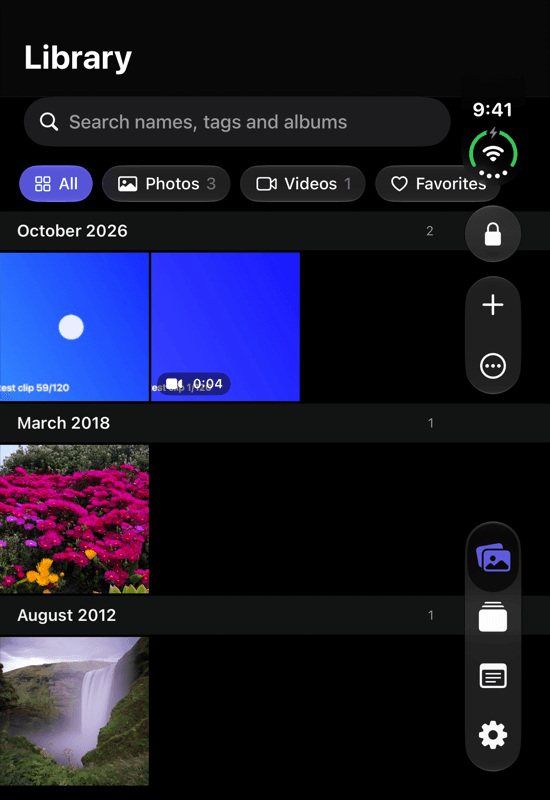
Vault Max uses the whole inner display, moves its controls into the side strip on the outer display, and locks itself the moment you fold the phone shut. Open it and the tabs become a sidebar with more columns in the grid.
Stand it partially open on a table and the viewer turns into a flex-mode photo stand: the picture on the upper half, the filmstrip and controls on the lower half. Touch ID in the side button unlocks it.
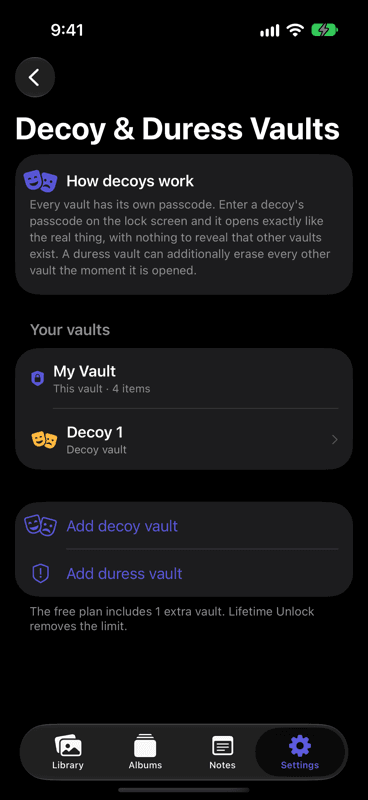
Each vault has its own passcode and looks exactly like the real one. Give a decoy its own harmless photos and that is what opens when its passcode is entered. A wrong code and a decoy code look the same on the lock screen.
A duress vault can be set to erase every other vault the moment it is opened. Nothing on the phone reveals how many vaults exist: not the lock screen, not the settings, not the files on disk.
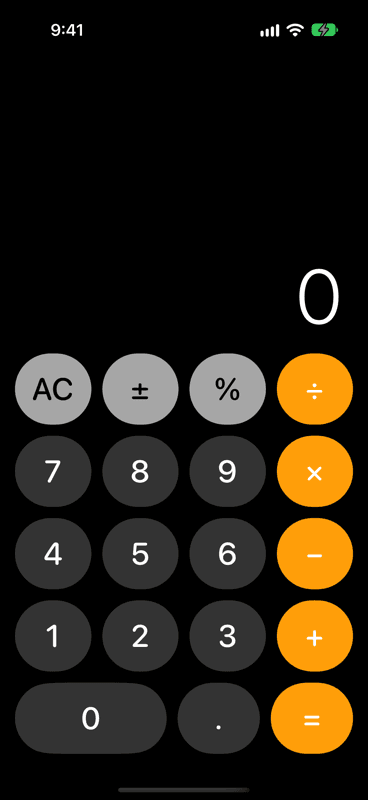
Turn on disguise mode and the app opens as a real calculator that adds, subtracts and divides. Type your passcode and press equals to unlock; press and hold equals for the normal lock screen.
Choose an alternative app icon to match: Calculator, Notes, Weather or Timer. A privacy cover hides the contents in the app switcher, and a shake or a face-down phone locks it.
A 4, 6 or 8-digit passcode, a password or a pattern. Add Face ID or Touch ID on top, or leave biometrics off. Wrong guesses are slowed with growing delays.
Opt in, and after repeated wrong passcodes the front camera takes a silent photo, sealed to your main vault with the time, the attempt count and the code that was tried.
Choose Vault Max in any app's share sheet. The item is encrypted on the spot, even while the vault is locked, and appears after the next unlock. The extension holds no keys.
The still and its clip are stored as one encrypted item. Touch and hold to play; export puts both halves back together.
Photos and videos straight into the vault, never through the Photos app. Originals you import are kept byte for byte, HEIC and HEVC untouched.
Albums with icons and colours, favorites, filters and search, drag and drop. The trash keeps deleted items for 7, 30 or 90 days before they are really gone.
Share from the vault with location and camera data removed, so the file that leaves carries only the picture.
Encrypted notes beside your photos, and previews for PDFs and other files you bring in from Files.
A single encrypted .vaultmax file holding every vault, protected by its own password. Keep it anywhere; restore it anywhere.
Every file is encrypted with AES-256-GCM under its own key, in chunks, with keys derived from your passcode and bound to your device's Keychain. Here is what that means, step by step.
The passcode is stretched with PBKDF2-HMAC-SHA256, calibrated to take about a third of a second on your device, then combined with a random secret that lives only in the device's Keychain. The result opens your vault's master key. Neither half is enough on its own.
From the master key, each file derives a key of its own and is encrypted with AES-256-GCM in one-megabyte chunks. Each chunk is authenticated and bound to its position and the file's length, so a file that has been cut, reordered or altered fails to open instead of opening wrong.
Playback reads the encrypted file in small slices and decrypts each one as the player asks for it. A multi-gigabyte video never sits in memory in one piece and is never written to disk in the clear.
Files have random names, thumbnails and notes and the index are encrypted too, and the keyring holds eight identical slots whether you have one vault or six. A copy of the app's files does not reveal how many vaults there are or which file belongs to which.
Lifetime Unlock is a single non-consumable in-app purchase, priced in US dollars and shown in your local currency on the App Store. The plan is device-wide and shows the same way in every vault. Restore Purchases is in Settings, under About.
More, including backups, Live Photos and the share sheet, on the help page.
No. Everything you put in it is encrypted and stored on your phone. There is no account, no server and no analytics; the only network connection the app makes is to Apple's App Store when you buy or restore Lifetime Unlock.
The vault cannot be opened by anyone, including us. The keys are derived from your passcode on the phone, so there is no reset link and no copy of the key anywhere. Keep an encrypted backup and you can restore it with a new passcode.
Free to start. The free plan holds up to 50 photos, videos and documents per vault plus one extra vault, with every security feature included. Lifetime Unlock is a one-time $19.99 purchase that removes the limits. There is no subscription.
Not from the app. Every vault opens with its own passcode and looks exactly like the others, and on disk the keyring has eight identical slots and every file has a random name, so nothing says how many vaults exist or which vault owns a file.
Yes. With the disguise on, the app opens as a working calculator. Type your passcode and press equals to unlock; press and hold equals to get the normal lock screen.
Each file is encrypted in one-megabyte chunks, so a multi-gigabyte video is never loaded into memory in one piece. Playback streams straight from the encrypted file; nothing is decrypted to disk.
iPhone, iPad and iPhone Duo on iOS 26 or later. On the Duo it moves its controls into the side strip when closed, locks when you fold it shut, and turns the viewer into a flex-mode stand when the phone is partially open.

Coming to the App Store on October 23, 2026. Free to start, $19.99 once for everything, and never a subscription.