
Hidden album vs photo vault on iPhone: which do you need?
Compare the iPhone Hidden collection with a separate photo vault: access, copies, backup and recovery, explained with real Vault Max screens and short demos.
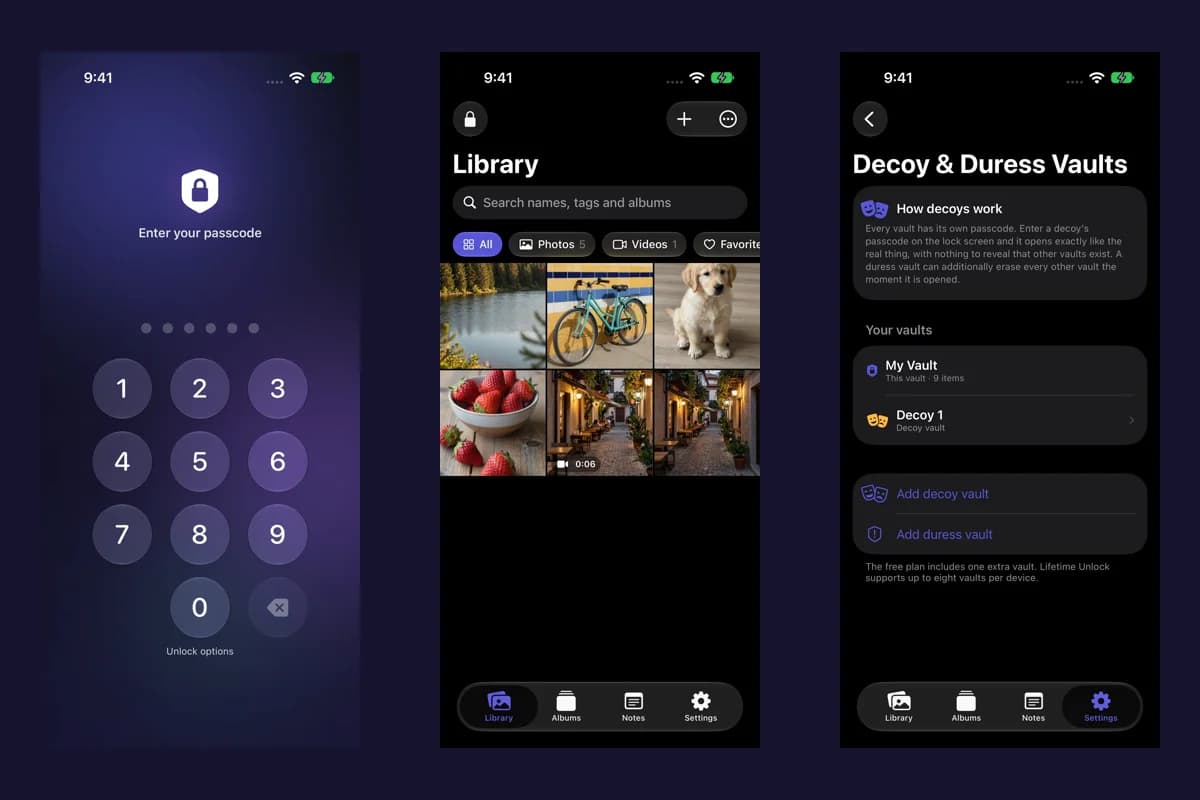
Actual Vault Max screens with sample content.
The iPhone's Hidden collection is a useful built-in option for keeping pictures out of your main photo library view. A separate vault is useful when you want its own credential, its own storage and an explicit backup workflow. Choose based on who should be able to open the pictures and how you will recover them, rather than the word “hidden” on an app's icon.
Sample Vault Max library. Select a screen for a closer look.
What Apple's Hidden collection does
Apple says the Hidden and Recently Deleted collections are locked by default and can be opened with Face ID, Touch ID or the device passcode. You can also switch off Show Hidden Album in Photos settings. Hiding a picture changes its visibility inside Photos; it does not create a new vault password. Apple's instructions.
That can be enough if you want to stop private pictures appearing during an ordinary scroll through your library. Someone who knows your iPhone passcode presents a different access question: the built-in collection uses the device's authentication options.
Vault Max with sample content. Use the controls to pause or replay.
What changes with Vault Max
Vault Max stores imported photos, videos, notes and files in an encrypted vault on the device. During setup you choose a vault credential. Biometrics are optional, and the app does not require a Vault Max account or upload your library to a Vault Max server.
The useful distinction is control over access and storage. A separate credential can give a private collection a different boundary from the phone's unlock code. The app also supports separate vaults, an app-switcher privacy cover and an encrypted backup file protected by a separate password.
None of those features makes an unlocked screen private from someone standing beside you. Open the item you need, consider your surroundings, and lock the vault when you finish.
| Decision | Apple's Hidden collection | Vault Max |
|---|---|---|
| Keep pictures out of the main Photos view | Built in | Import a separate copy into the app |
| Choose a separate vault credential | No separate Hidden collection password | Chosen during vault setup |
| Use a local-only app without creating an app account | Part of Apple Photos | No Vault Max account or server |
| Back up the app's collection separately | Follows your Photos/device setup | Password-protected .vaultmax file |
| Recover after forgetting the vault credential | Uses device authentication; recovery depends on your Photos and device backups | Requires an available supported unlock path or an existing usable backup |
Sample Vault Max library. Select a screen for a closer look.
Importing does not remove the original
Putting a picture into a vault and removing its original are separate actions. Check that the imported copy opens correctly before deciding what to do with the Photos copy. Also decide how you will back up the vault before making it the only remaining copy.
Apple says changes made with iCloud Photos can affect other signed-in devices. Deleted items can remain in Recently Deleted for 30 days. Understand that behavior before deleting anything you want to keep. Apple's deletion and recovery guidance.
Sample Vault Max library. Select a screen for a closer look.
The recovery tradeoff
With Vault Max, there is no account reset link that gives us access to your private files. An encrypted backup has its own password and can be restored with a new vault passcode. If you lose access to the original vault and have no usable backup, we cannot retrieve the files for you.
Keep the backup outside the phone if losing the phone is the problem you want it to solve. Keep its password somewhere you can access independently. Buying a paid plan or restoring a purchase restores access rights to features; it does not restore your private media.
Vault Max with sample content. Use the controls to pause or replay.
Which option should you choose?
Start with the Hidden collection if its built-in controls meet your needs. Consider Vault Max if you want a separate credential, files and notes beside your photos, and a backup file whose location you choose. You can try the free plan before choosing an optional paid plan.
View Vault Max on the App Store. For product-specific recovery and backup questions, see Vault Max help.
More guides
- How to hide photos on iPhone, with or without a separate vaultHide photos with Apple's Hidden album or import them into Vault Max. Learn what happens to originals, how to check your copies, and when to make a backup.
- How to import photos, videos and files into Vault MaxFollow Photos, Files and share-sheet import routes in Vault Max, verify your saved items, handle originals carefully, and organize a private media library.
- Vault Max privacy features: break-in photos, decoy vaults and quick locksExplore Vault Max's break-in photos, calculator disguise, decoy vaults, private camera, panic lock and encrypted backups, with app screens and footage.
- Back up Vault Max before changing your iPhoneCreate a password-protected Vault Max backup, choose where to save it, and understand restore and recovery before moving or erasing your iPhone.
- Using a photo vault without an account or cloud librarySee how a local iPhone photo vault works without an app account, what Apple purchases use, and how backup destinations change your cloud choices.
- Forgot your Vault Max passcode? Check these recovery paths firstCheck biometric access, credential type and encrypted backups before changing anything. Understand which Vault Max recovery paths can preserve your files.
- Moving your photo vault to a new iPhone: a Vault Max checklistPlan a new-iPhone move with a Vault Max backup, a careful restore, checks for media and child vaults, and a final checklist before handing off the old phone.