
How to set up break-in photos in Vault Max
Set up Vault Max break-in photos, choose a wrong-code threshold, review saved attempt records, and understand camera permissions and missing-photo results.
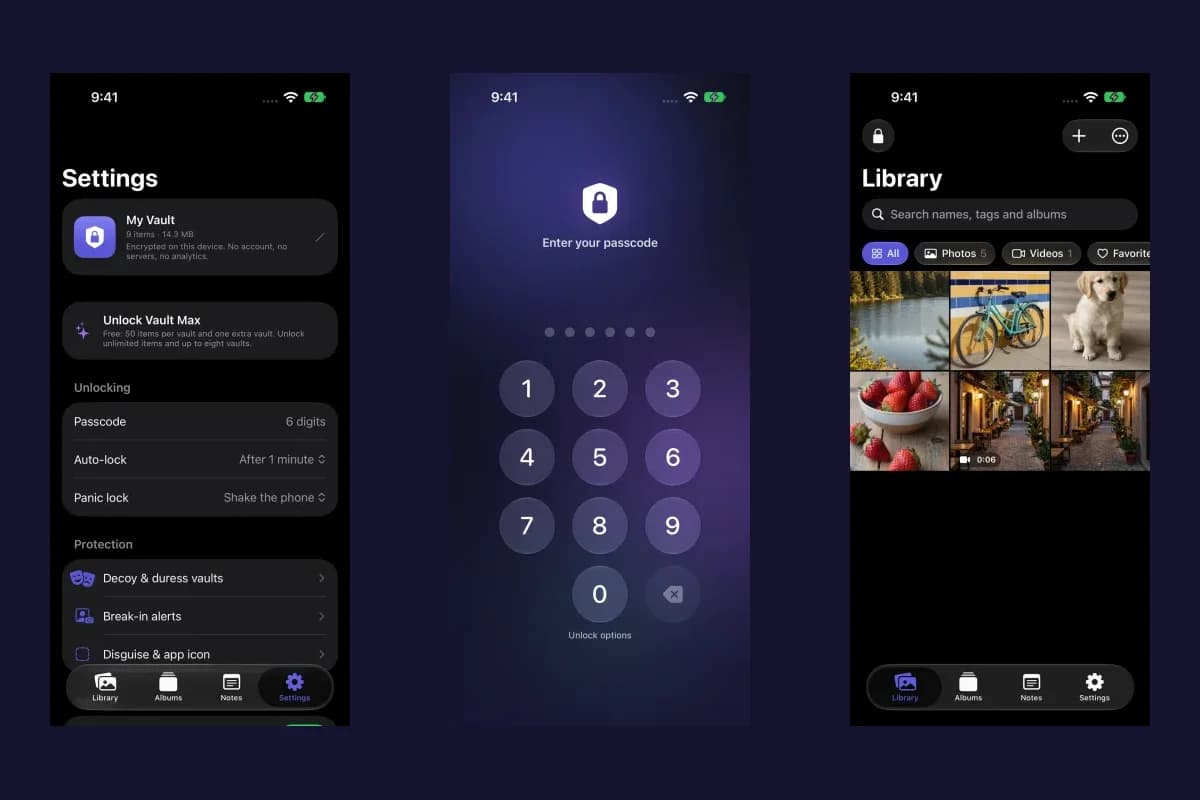
Actual Vault Max screens with sample content.
To enable break-in photos in Vault Max, unlock your main vault and open Settings → Break-in alerts. Turn the feature on, allow camera access and choose a threshold from one to five wrong attempts. Once that threshold is reached, the app attempts a front-camera photo and seals an attempt record for your main vault to review after unlock.
This feature helps you review attempts to open your private library. It responds to incorrect credentials entered into Vault Max. Your own mistyped codes can create records too, so check the time and attempt count when reviewing one.
Set up the feature while you can unlock the vault
- Open the main vault and choose Settings.
- Under Protection, open Break-in alerts.
- Enable Break-in alerts and respond to the camera-access request.
- Choose After 1–5 wrong attempts to set the capture threshold.
- Return to your library and lock the vault when finished.
Sample Vault Max library. Select a screen for a closer look.
The camera needs to be available, and access needs to be granted before capture can work. Vault Max does not wait until someone is at the locked keypad to ask them for camera permission. If the toggle cannot stay enabled, read the message on the feature screen and check the camera access described below.
Choose a threshold that makes sense for your use
A lower threshold can record an attempt sooner, including an ordinary typo of your own code. A higher threshold waits for more wrong attempts before capture is attempted. The setting does not change your vault credential or make a failed code valid.
Vault Max also applies increasing delays to wrong-code attempts. A countdown means you need to wait before trying again. Keep your real credential available instead of treating repeated guessing as a way to recover access.
Sample Vault Max library. Select a screen for a closer look.
If you have already forgotten your own credential, follow the Vault Max recovery guide. Enabling or reviewing break-in alerts does not replace a working unlock method or a usable encrypted backup.
Review attempts after unlocking the main vault
Return to Settings → Break-in alerts after unlocking the main vault. The Attempts section lists saved records. Open a record to inspect its details: the date and time, failed-attempt count, and a photo when capture succeeded. A record can also show the attempted credential; keep that information private because a mistyped code may resemble your real one.
Vault Max with sample content. Use the controls to pause or replay.
The record is encrypted for the main vault. Review it inside the app after unlock and compare it with activity you recognize. The name Break-in alerts describes this in-app feature; the workflow here is to check the saved records in Vault Max.
Use Clear log to remove saved attempt records when you no longer want them. Turning the feature off stops future capture attempts; it is a separate choice from clearing the existing log.
Check camera permission and understand a missing photo
On iPhone, open Settings → Privacy & Security → Camera to review Vault Max's camera access. Allow it if you want to use capture. Apple explains that iOS shows a green indicator when an app uses the camera. See Apple's hardware-permission guide.
A missing photo can occur when access is unavailable, the front camera cannot start, or capture is interrupted before a usable frame arrives. The attempt record can still exist without a picture. Read its details rather than interpreting an empty image area as a successful face capture.
Sample Vault Max library. Select a screen for a closer look.
If you want to check the setup on your own phone, use your own known test attempt after saving any important work. Allow the configured threshold and any countdown to take effect, then unlock the main vault and inspect the record. Avoid repeatedly entering guessed codes or experimenting with a configured duress credential.
Combine attempted-access records with a recovery plan
Break-in photos answer a different question from backup: an attempt record helps you review access attempts, while an encrypted archive helps recover your files after device loss. Make a fresh backup of important content in Settings → Encrypted backup and keep its password independently of the phone.
Sample Vault Max library. Select a screen for a closer look.
Read the backup walkthrough for the export and restore steps. For other ways to control how the app opens, see calculator disguise and decoy vaults. Break-in alerts and the other security features are included in the free plan; optional subscriptions and Lifetime Unlock increase the item and vault limits.
More guides
- Use Vault Max as a calculator photo vault on iPhoneSet up Vault Max's calculator disguise, unlock with a PIN and equals, find the password or pattern fallback, and understand what the icon changes reveal.
- Set up a decoy photo vault in Vault MaxCreate a Vault Max decoy with its code, add a separate collection, check which library opens, and understand backup, capacity and duress-vault differences.
- Vault Max privacy features: break-in photos, decoy vaults and quick locksExplore Vault Max's break-in photos, calculator disguise, decoy vaults, private camera, panic lock and encrypted backups, with app screens and footage.
- Forgot your Vault Max passcode? Check these recovery paths firstCheck biometric access, credential type and encrypted backups before changing anything. Understand which Vault Max recovery paths can preserve your files.
- A photo vault built for iPhone Duo: explore Vault Max's layoutsSee Vault Max on iPhone Duo: a wider photo grid, split viewer, filmstrip, focused notes and optional fold-to-lock, with fresh real app screens and footage.
- Back up Vault Max before changing your iPhoneCreate a password-protected Vault Max backup, choose where to save it, and understand restore and recovery before moving or erasing your iPhone.
- Encrypted notes on iPhone: write, save and protect them in Vault MaxCreate encrypted notes in Vault Max on iPhone and Duo. Follow the editor, saving, locking, deletion and backup steps, with fresh app screens and loops.
- Hidden album vs photo vault on iPhone: which do you need?Compare the iPhone Hidden collection with a separate photo vault: access, copies, backup and recovery, explained with real Vault Max screens and short demos.
- How to hide photos on iPhone, with or without a separate vaultHide photos with Apple's Hidden album or import them into Vault Max. Learn what happens to originals, how to check your copies, and when to make a backup.
- How to import photos, videos and files into Vault MaxFollow Photos, Files and share-sheet import routes in Vault Max, verify your saved items, handle originals carefully, and organize a private media library.
- Moving your photo vault to a new iPhone: a Vault Max checklistPlan a new-iPhone move with a Vault Max backup, a careful restore, checks for media and child vaults, and a final checklist before handing off the old phone.
- Panic lock on iPhone: quickly close your Vault Max sessionSet up Vault Max panic lock, choose shake or face down, and understand manual lock, background auto-lock and Duo fold-to-lock with fresh real app screens.
- Private Camera on iPhone: take photos straight into Vault MaxUse Vault Max Private Camera to save new photos and videos inside your encrypted vault. Learn the controls, permissions, albums, saving and backup steps.
- Using a photo vault without an account or cloud librarySee how a local iPhone photo vault works without an app account, what Apple purchases use, and how backup destinations change your cloud choices.