
App comparisons
Vault Max vs Hide it Pro: privacy matters on the way out, too
Compare Vault Max and Hide it Pro on iPhone: albums, imports, USB export, disguise, recovery and cloud storage. Identify the exact app before moving files.

Choose Vault Max for a local media-and-notes collection with documented encryption, a working calculator and a clearly defined password-protected recovery archive. Its $19.99 U.S. Lifetime Unlock gives that workspace a straightforward one-time capacity option. In this comparison with Hide it Pro, the ability to retrieve your files carries as much weight as the first import.
We make Vault Max. The other product here is Hide Photos Video -Hide it Pro, by Anuj Tenani, App Store ID 523488488. We checked first-party information on October 23, 2026. We have not installed Hide it Pro or completed an export, cloud restore or new-device migration with it.
Inspect the iPhone offer in the publisher's gallery
The official App Store gallery can help you identify the interface and content types being marketed for the iPhone edition. Read it with the numerical app ID beside you. A familiar brand's Android screenshot or a similarly named locker should not become the basis for an iPhone migration decision.
The competitor images accompanying this guide are credited publisher marketing assets. They do not show us operating a private account. Use them to orient yourself, then check the actual controls and receiving files on your installation. A gallery image cannot prove that a USB export completed or that a cloud backup contains every video you care about.
Publisher-supplied screenshots. Source material, not a hands-on test.
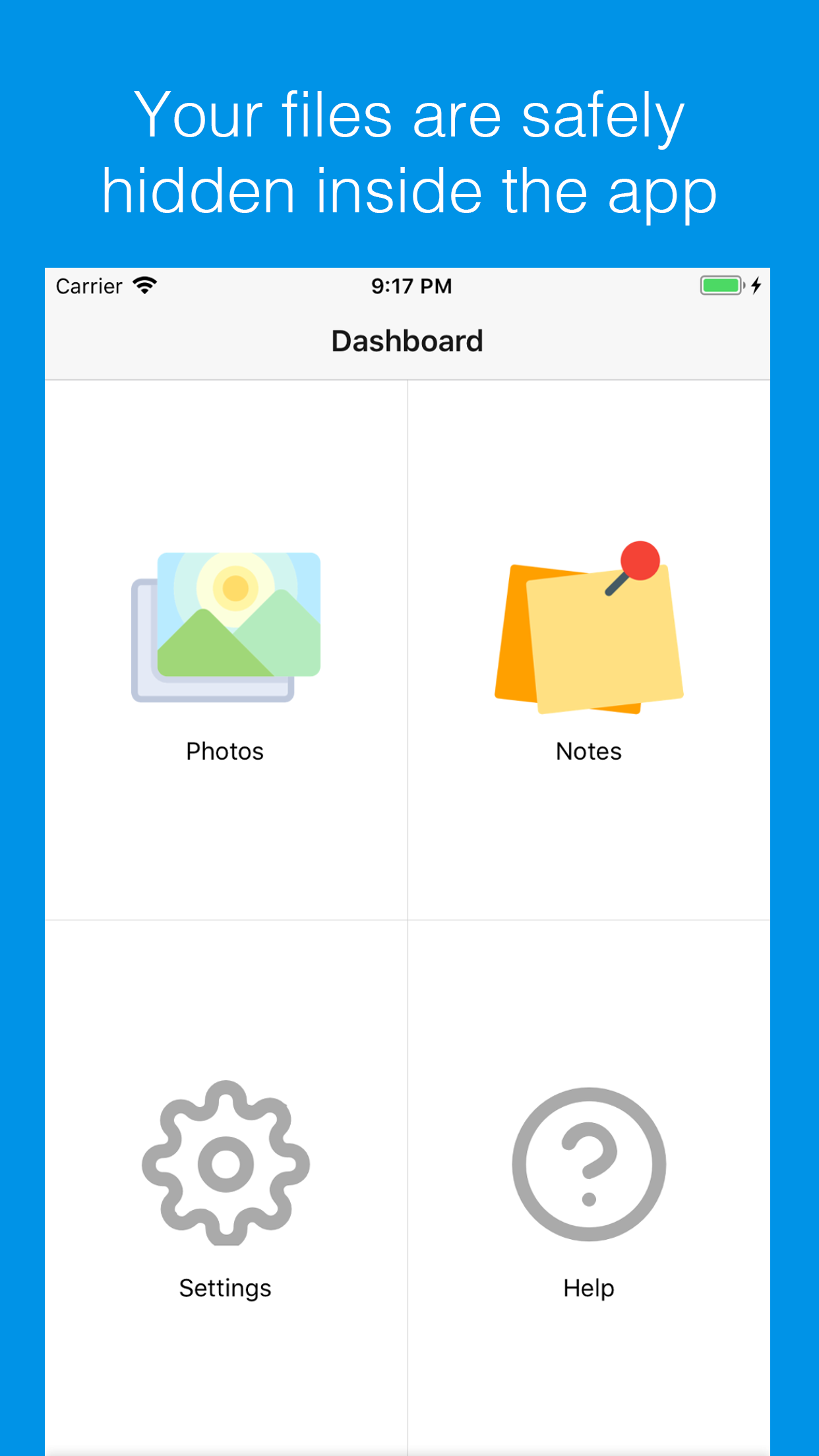
The dashboard advertises private writing beside photos. This comparison uses the iOS app's published scope rather than importing Android-only features.
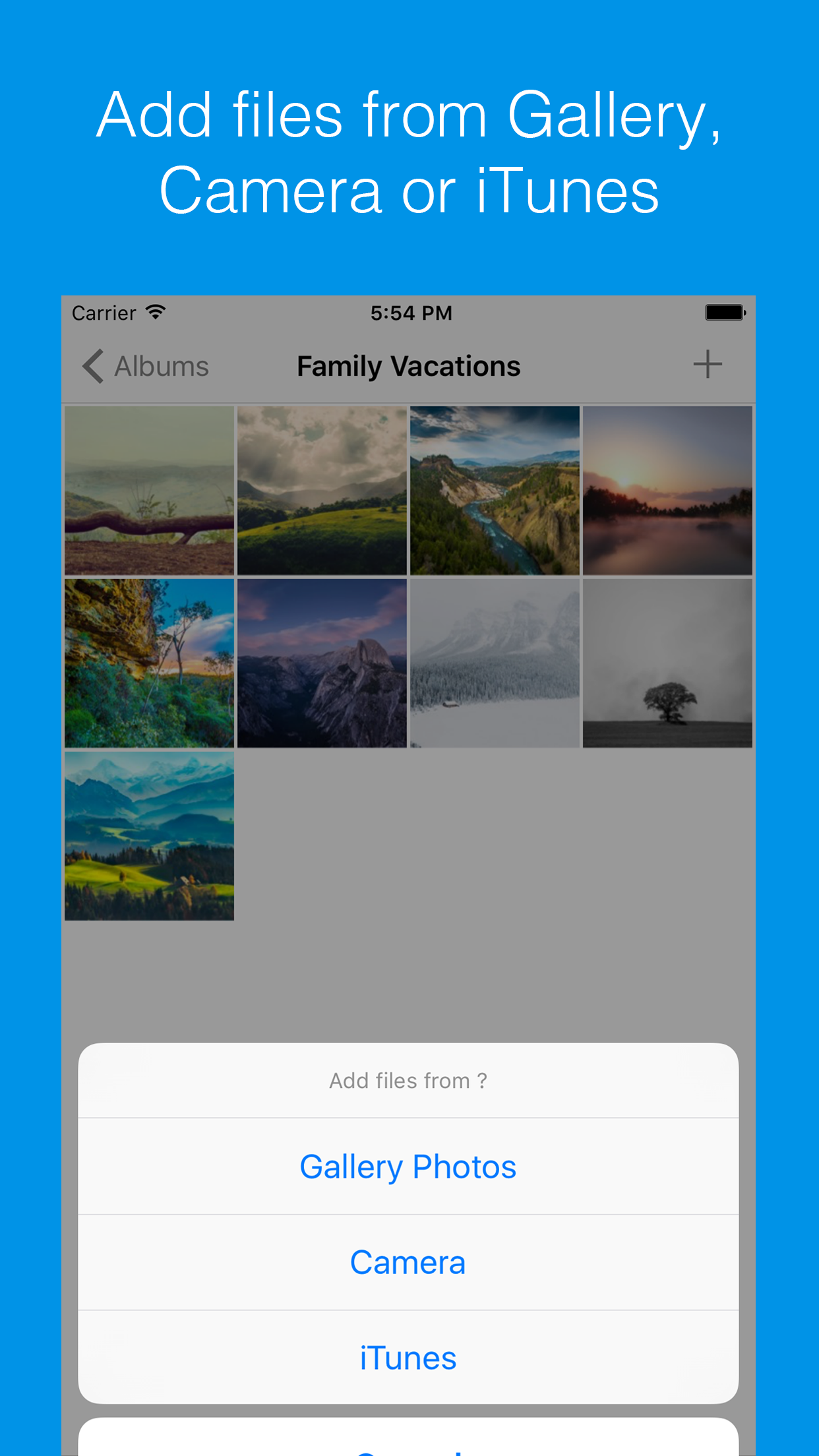
Open the full-size source imageThe listing's import artwork includes a legacy iTunes route. Verify a currently supported transfer path before depending on it for a migration.
Open the full-size source imageStart with the right platform
Hide it Pro has an iPhone edition and an Android presence under the same brand. Its general website advertises several capabilities across the product family. That does not establish that every Android disguise or app-lock function exists in the iOS listing.
For this comparison, the iPhone listing is the starting point: albums, gallery/camera imports, viewing, export, cloud storage and specific disguise behavior. If a feature brings you to the app, verify that it appears in the offer for the platform you are actually installing.
This is especially useful for someone returning to a familiar brand after changing phones. The product name may remain familiar while the import route, storage permissions and available features change. Keep the original device and its usable copies intact until you have checked the replacement workflow.
Follow one file through the complete route
Hide it Pro advertises import from the phone gallery, iTunes and camera, plus USB export and returning media to the gallery. Those descriptions establish advertised routes, rather than a tested transfer result or a complete recovery plan.
Vault Max imports through Photos, Files, private capture and supported share-sheet attachments. Its import walkthrough shows how to inspect a result before responding to the offer to remove an original. Importing is not a command that retroactively protects every source copy.
Sample Vault Max library. Select a screen for a closer look.
For your trial, pick a recognizable picture and a short, unimportant video. Import, open and export both. Check the receiving location and confirm that the exported video is the one you intended. A still thumbnail appearing in a vault is not a complete playback or export check.
Use a replacement-phone move as the buying scenario
Suppose your old iPhone is still working and the new one is beside it. This is a useful moment to compare the recovery workflow, because you can check the new copy while the old copy remains available. It is a poor moment to experiment with deleting the only library.
List what needs to move: media, album organization and any alternate collection. Then identify the actual transfer object. With Hide it Pro, its advertised USB export may be an attractive route for someone who wants a computer-accessible set of media; establish what the current export includes. A directory of ordinary images may satisfy that job without being a full restore of app preferences and private-access settings.
With Vault Max, a .vaultmax archive is the defined recovery object. Restore creates the primary collection under a new vault credential. Included child-vault credentials are assigned afterwards in Settings, under Decoy & duress. An ordinary export to Photos serves a different purpose. Choose the object that matches the job before starting a large transfer.
Keep the old phone intact until the receiving copies open and the intended organization is checked. If the source app needs an account or paid service for a step, resolve that requirement while you still have access. Restoring Apple purchases by itself does not copy the media from one vault product into another.
Distinguish file export from a recoverable vault
An export to the photo library gives you an ordinary outside copy. A vault archive may preserve organization, private content and access material differently. A cloud copy adds another destination with its own account and retention rules.
| Question | Vault Max | Hide it Pro for iPhone |
|---|---|---|
| How do files enter? | Photos, Files, private camera and supported share sheet | Gallery, iTunes and camera advertised |
| How do ordinary copies leave? | Supported share/export routes | Gallery and USB export advertised |
| What is the recovery object? | Password-protected .vaultmax archive | Cloud storage advertised; exact current restore requirements need checking |
| What does an alternate entrance show? | Separate ordinary decoy collection or calculator entry | Crash-like disguise and empty Escape Unlock view advertised |
| Paid offer used here | $14.99/year or $19.99 Lifetime Unlock | Cloud Storage label does not supply a matched annual term |
Ask what an export preserves before depending on it: original files, album order, notes, child collections or just selected media. Vault Max's archive contains the chosen vault and its included descendants, protected with a separate archive password. A photo shared outside the app is a different object and no longer needs the vault credential to view.
The destination is another part of that distinction. A file saved to a computer is outside the phone's vault even if it arrived by a convenient USB route. A password-protected archive still needs appropriate storage and a retrievable password. A file saved only to the old phone may not help when the entire phone is unavailable.
An empty view is a particular kind of disguise
Hide it Pro advertises an Escape Unlock code that makes the app look empty, as well as a disguise that presents it as crashed. Those are presentation choices to evaluate on their own terms. They should not be described as if they necessarily create a populated second library.
Vault Max's ordinary decoy has separate content. You can prepare everyday sample pictures in it and open that collection with its own credential. Its working calculator is another entry option. The calculator-versus-decoy guide explains why those actions differ.
Choose an approach you understand without assuming a confrontation will unfold as planned. An icon, an empty gallery or a simulated error cannot guarantee that an installed app is undiscoverable. Keep ordinary decoy behavior separate from destructive local duress settings, which can remove other Vault Max vaults and require special care.
What can the public security information establish?
Hide it Pro's general site advertises encrypted on-device storage. Its inspected iOS information does not provide the detailed cipher and key-management specification needed for us to compare each file boundary. We do not turn that documentation gap into a claim that its stored files are unencrypted.
Its 2018 privacy policy discusses third-party advertising SDK data while saying the publisher cannot access private media. The current Apple declaration lists unlinked diagnostics. The older policy covers the wider service; it is not a verified inventory of SDKs in today's iPhone build.
Vault Max has no app analytics or telemetry. Its on-device files use authenticated encryption, with encrypted notes and library index too. That is the design of the app we publish, not a certification that a calculator or a local storage path defeats every threat.
Keep the payment and recovery questions separate
The U.S. listing has Cloud Storage at $9.99 and Password Reset at $4.99. Those labels describe different purchases. Neither gives us a reliable annual-versus-lifetime price comparison, and a paid reset label does not explain exactly which content or credential it can recover.
| Purchase | U.S. price | Comparison limit |
|---|---|---|
| Vault Max Weekly | $1.49/week | Paid capacity; no hosted cloud library |
| Vault Max Monthly | $3.99/month | Same capacity benefit, different interval |
| Vault Max Annual | $14.99/year | Same capacity benefit, annual renewal |
| Vault Max Lifetime Unlock | $19.99 once | One-time capacity purchase |
| Hide it Pro Cloud Storage | $9.99 | Generic public label does not establish this entry's term |
| Hide it Pro Password Reset | $4.99 | Recovery-related purchase, not a matched vault-capacity plan |
Before buying recovery assistance, ask which credential the action changes and which stored copies it can open. A reset that restores an app login is not necessarily a reset of a separately encrypted backup password. We have not used Hide it Pro's paid reset and cannot promise it will recover a particular file or account.
Record the exact app ID and the wording of the recovery offer with your purchase information. That makes a future support request more precise, especially when a familiar brand spans platforms. Keep the password record separate from the only phone or archive whose access depends on it.
Vault Max's plans are explicit: $1.49 weekly, $3.99 monthly, $14.99 annually or $19.99 once. Paid capacity benefits are the same across those choices. Support cannot reset the original vault password to reconstruct its encryption keys; a usable archive and its separate password provide the documented restore route.
Before choosing, write down where the recovery copy is and what opens it. Keep that credential independently available. Refresh the saved copy after important changes and check it before erasing a device. We recommend Vault Max for the combination of local media, encrypted writing, calculator entry and a defined archive workflow. You can try the security controls free before deciding whether the collection needs paid capacity.
Common questions
Which Hide it Pro app is compared here?
Hide Photos Video -Hide it Pro by Anuj Tenani, App Store ID 523488488. Features associated with its Android edition are not automatically treated as iPhone features.
Does Hide it Pro offer export and alternate entry?
Its iPhone listing advertises USB export, export back to the photo library, cloud storage, a crash-like disguise and an Escape Unlock code that makes the app look empty.
Is the $9.99 Cloud Storage entry a matched annual plan?
No. The public IAP label does not name an annual term. The description discusses monthly cloud subscriptions, but we do not turn that generic entry into an annual or lifetime comparison.
Continue reading
More guides
Practical tips for your private library. Swipe or scroll to choose your next guide.


















































50 guides to explore