
App comparisons
Vault Max vs Vaultaire: the price, the calculator, the backup
Compare Vault Max and Vaultaire on price, local encryption, calculator entry, decoy vaults and backup choices, with real Vault Max screens and sources.

Choose Vault Max if you want a working calculator entrance, separate private collections and a lower published lifetime price. Vault Max combines that entrance with encrypted media and notes, no app account and no app telemetry. Both products describe local encryption; the useful comparison is the credential, collection, price and recovery routine you will use.
We make Vault Max. This is our comparison, based on our app's implementation and the other app's official information checked October 23, 2026. We have not performed an independent security audit or a hands-on test of Vaultaire.
The useful differences, side by side
| What you are choosing | Vault Max | Vaultaire |
|---|---|---|
| Annual paid capacity | $14.99/year | $19.99/year |
| Lifetime plan | $19.99 once | $39.99 once |
| Local encrypted storage | Yes; no Vault Max account | Yes; no required account |
| App analytics and diagnostics | No app analytics or telemetry | Enabled by default; can be turned off |
| Calculator entrance | Working calculator with PIN-and-equals entry | Alternate calculator icon; pattern unlock interface |
| Separate/decoy vaults | Yes | Yes |
| Recovery copy | Password-protected archive; choose the Files destination | Encrypted iCloud backup enabled by default |
Vault Max’s archive is a file you control, with a password and Files destination you choose. That fits the same straightforward model as the working library: a separate private collection and an explicit recovery copy.
Vault Max has no app analytics or telemetry. Vaultaire’s privacy policy says app analytics and crash diagnostics start enabled and can be turned off in Settings. The policy excludes vault contents, patterns and recovery phrases from that analytics collection. If you prefer an app without that diagnostics service, Vault Max keeps the choice simple.
Start with the free collection
You can test the basic workflow before buying either app. Vault Max’s free plan includes 50 counted photos, videos and files per vault, one extra vault and every security control. Notes are unlimited within the device’s available storage. Paid capacity allows unlimited counted items and up to eight total vaults per device.
Vaultaire’s published free plan has three vaults, 100 photos and 10 videos in total. Those limits are structured differently: a per-vault item allowance is not the same measurement as an app-wide photo and video allowance. Count the kinds of files and separate collections you need instead of comparing one large number in isolation.
Try one ordinary picture and a short video first. Check the import, the full-size viewer and the way you lock the app again. Keep the originals while you do this. A free plan is a useful way to discover whether the entrance and collection suit you; it is not a reason to move your only copy before understanding recovery.
Read the publisher’s screens as a workflow
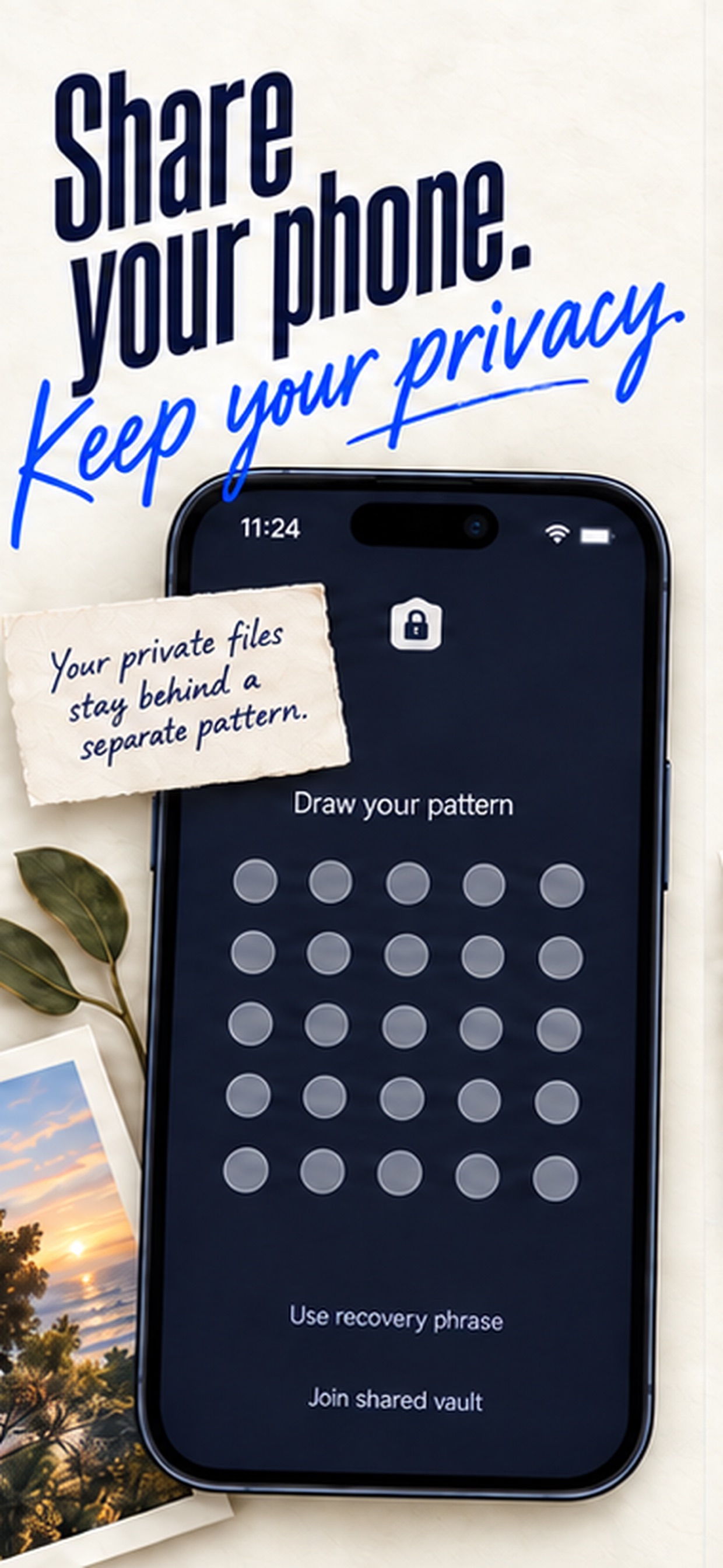
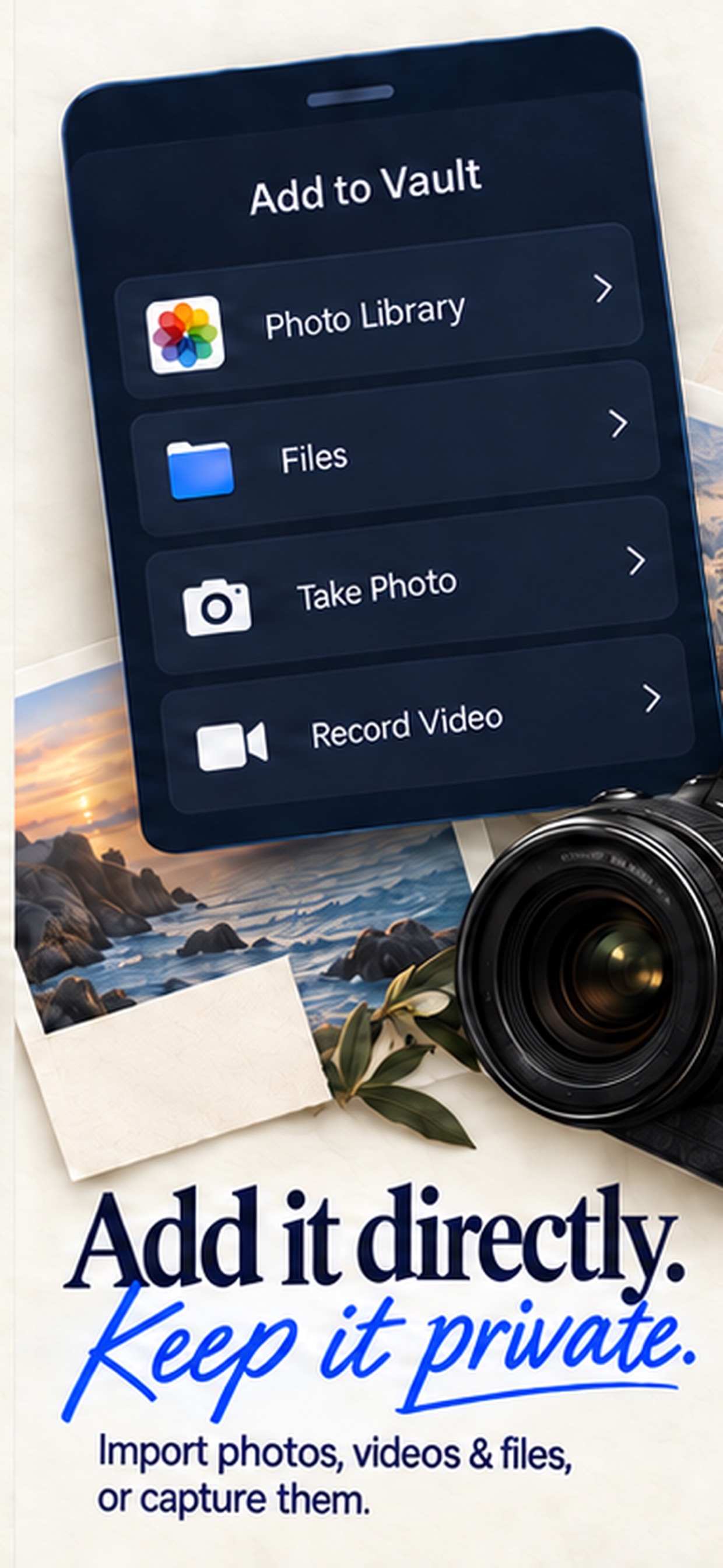
Vaultaire’s supplied screenshots below present its pattern entrance and import choices. Compare those tasks with the working Vault Max calculator shown later in this guide. An import menu can help you understand the available route into a collection. It cannot tell you whether an archive restores, how an app behaves with your largest file or whether its cryptography has passed an independent audit.
Publisher-supplied screenshots. Source material, not a hands-on test.
The pattern screen makes the separate credential visible. Compare that access method with Vault Max's PIN, password, pattern and optional biometrics.
Open the full-size source imagePhotos, Files and direct capture are all advertised here. Those import routes are shared capabilities, not a Vault Max exclusive.
Open the full-size source imageThe calculator changes the entrance
A calculator icon is something on the Home Screen. A calculator entrance is what someone sees after opening the app. Vault Max's calculator actually performs arithmetic. Your configured PIN followed by equals opens your collection.
Vault Max with sample content. Use the controls to pause or replay.
Vaultaire's alternate-icon explanation says that its calculator and printer icons still lead to the pattern screen. That is a practical distinction if the entrance is why you searched for a calculator vault. It does not prove that a disguise can fool someone examining your phone.
Vault Max also offers a regular unlock route. A changed disguise setting should not leave you guessing how to reach your own files. Read the calculator setup and interactive walkthrough before making the disguise your everyday entrance.
Separate collections are useful for different reasons
Vault Max can open different vaults with their own credentials. You can keep an ordinary collection ready to show and a different private collection behind another credential. The calculator entrance and the choice of collection solve different problems.
Sample Vault Max library. Select a screen for a closer look.
Vaultaire offers decoy vaults too. Compare how many collections you need, how you will organize them, and how each enters your backup plan. Vault Max's paid capacity supports up to eight total vaults per device; it is not unlimited vault creation.
Local encryption does not answer the backup question
Vaultaire's official product information describes local AES-256-GCM storage, and its backup feature describes encrypted iCloud backup. Encrypted cloud storage is still cloud storage, but it is not the same as sending readable photos to a provider.
Vault Max has no provider-hosted library. You can create a separately password-protected .vaultmax archive and choose its destination through Files. A cloud-backed Files destination still places that archive with a cloud provider. Device-backup participation is another setting to review. The working library stays local; the destination you choose determines where the exported backup lives.
Sample Vault Max library. Select a screen for a closer look.
For a new-phone move, read the backup guide. Buying Lifetime Unlock does not back up a single photograph.
Decide how a lost-phone recovery would work
For Vaultaire, understand the encrypted iCloud backup and the credential or recovery material needed to restore it. Confirm that the relevant data has reached the backup before relying on it. Automatic backup can reduce the need to remember a manual export; it still needs a working recovery setup.
For Vault Max, the archive is a snapshot you create. New material added after that snapshot needs another backup. Keep the archive somewhere that survives loss of the phone, and keep its separate password available independently. If you use several vaults, check the backup instructions for the scope of the archive rather than assuming every collection is included.
This is where the no-account model asks something of its owner. We cannot send an email that bypasses a lost vault credential and decrypts your original library. An existing usable archive and its password can provide another route. Restoring an App Store purchase restores the entitlement to paid capacity, not the private files.
What the price package means in practice
Vault Max’s paid plans enlarge a collection you can already try free: private media and notes, a working calculator, separate credentials and practical locking controls. At the stated U.S. prices, Lifetime Unlock buys that paid capacity for $19.99 once. You choose where the recovery archive is saved.
Vaultaire’s package includes its own encrypted backup, sync and sharing workflows. Those are different service arrangements, so read their requirements alongside the price. A Vault Max archive is a recovery snapshot, not live sync. Our recommendation rests on Vault Max’s local workspace, lack of app analytics and lower matched price, rather than claiming the packages are identical.
For Vault Max subscriptions, existing content remains available to open, export, delete and back up after expiry; the capacity rules affect further additions. Check each app’s current purchase sheet for its own entitlement and renewal terms. The included services are part of the price comparison.
What the lower price buys
Vault Max's published U.S. annual plan is $5 less than Vaultaire's named annual plan. Its $19.99 lifetime plan is $20 less than Vaultaire's named $39.99 lifetime plan. Regional prices and promotional offers can differ.
See Vault Max’s current plans and the named plans in the Vaultaire U.S. listing. Check the purchase sheet before paying. Vault Max also offers weekly and monthly plans; a shorter billing interval is not automatically better value.
For our priorities, Vault Max wins: a working calculator, private media and notes, separate vaults, and a modest one-time price without building a cloud library into the product. Try that workflow free with an ordinary photo, check the calculator entrance and keep a usable archive. At the matched lifetime prices, the capacity upgrade is $20 less. The separate credential and recovery routine are what make that saving useful.
Common questions
Is Vault Max cheaper than Vaultaire?
Vault Max's published U.S. prices are $14.99 annually and $19.99 for Lifetime Unlock, compared with Vaultaire's named $19.99 annual and $39.99 lifetime plans checked on October 23, 2026. Offers and regional prices can differ.
Does Vaultaire also encrypt files on the phone?
Yes. Vaultaire describes local AES-256-GCM encryption and does not require an account for the local vault. Local encryption is not unique to Vault Max.
Does a calculator icon mean the app opens as a working calculator?
No. An alternate icon and an interactive calculator entrance are different features. Vault Max provides a working calculator entrance; Vaultaire describes alternate icons that still open its pattern interface.
Continue reading
More guides
Practical tips for your private library. Swipe or scroll to choose your next guide.


















































50 guides to explore